Project Case Study: Technical SEO site management and maintenance
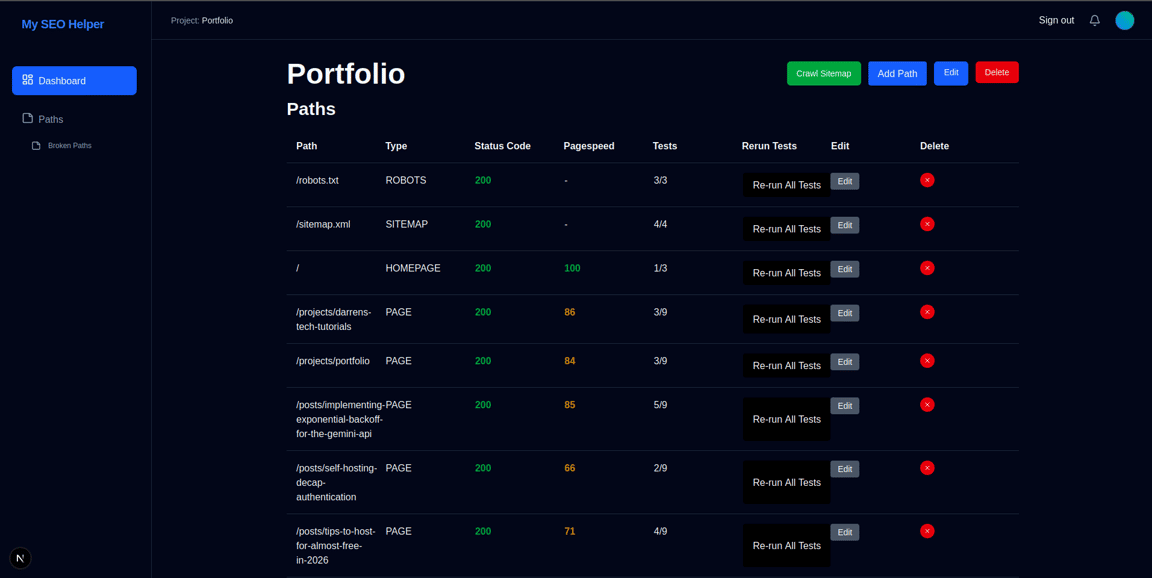
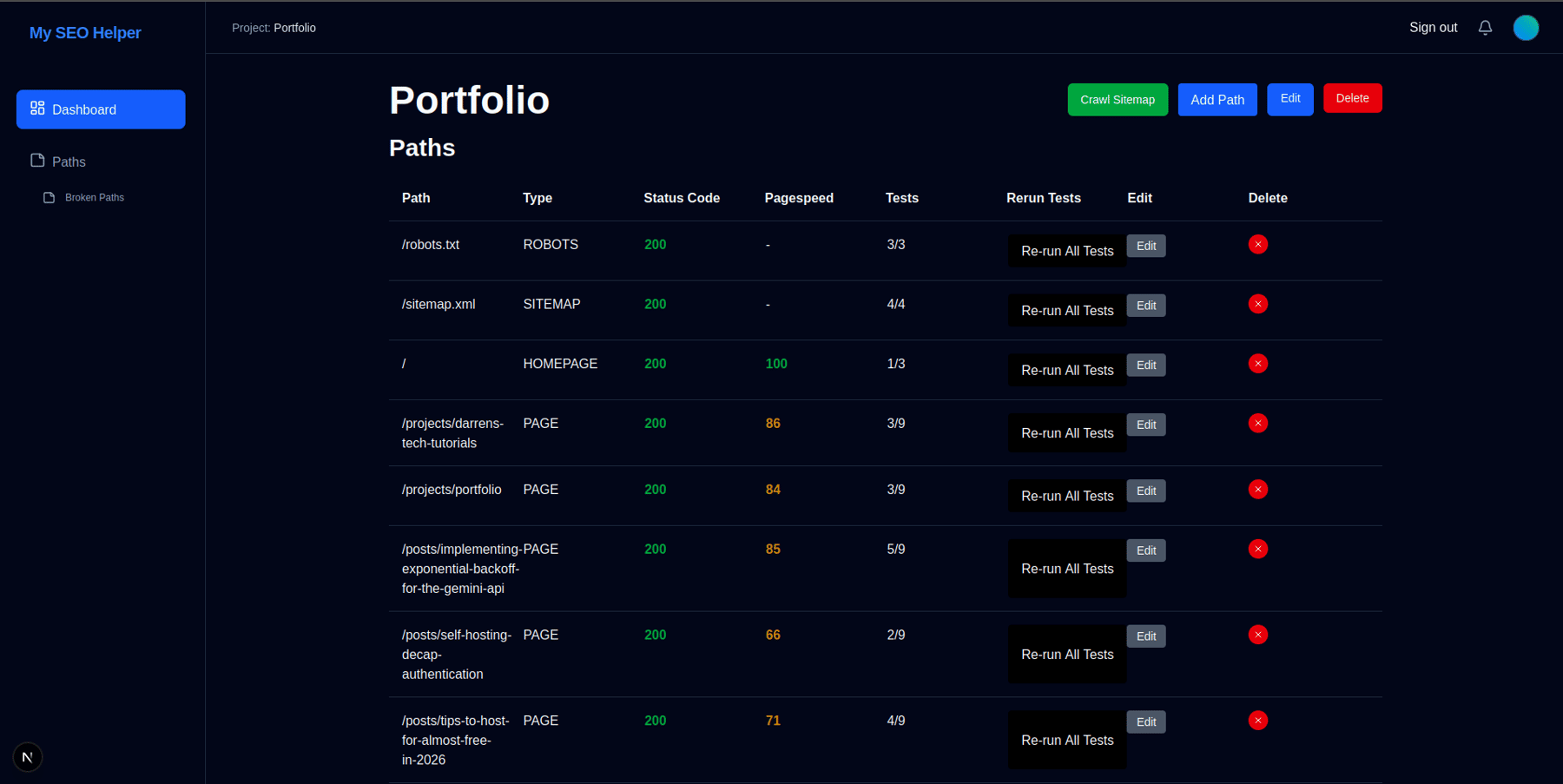
Like many developers managing multiple websites, I've found it difficult to keep track of the general SEO health of websites after I've deployed them. On first deploy I do all the checks that the robots.txt and sitemap.xml are set up correctly but often never come back and verify everything is still good as pages are added and the site grows.
With a lot of SEO tools being expensive and having more focus on the non technical side, and free health check services focusing on pinging websites to check if they return a 200 response I finally decided to build myself a small dashboard I can add functionality to over time.
I decided to use Next.js to build my SEO helper to improve my knowledge of react and understand the usage of server components in their current state as a web development tool. This ended up being a great learning process as the stack differs quite a bit from a traditional MVC framework , or SPA flows I have been used to. I decided to use it as a full stack framework rather than building the frontend in next and using a separate backend. Initially I felt this was a good solution but as I've gotten further into the project I think I have learned more about the pros and cons of next as a full stack framework and where its main limitations apply.
But first I needed to outline the technical health checks I needed to do when pushing a new site live. The main three areas to cover where the robots.txt, sitemap.xml, and the homepage.
Tech Checks
Robots.txt
- Should be exist and return a 200 response
- Should contain a valid sitemap entry
- Should no block any crawlers (for production URLs)
Sitemap.xml
- Contains valid XML
- Uses HTTPS for all URLs
- Does not exceed size limits (50MB, 50,000 URLs)
Homepage
- Returns a successful response
- Title tag
- Meta description
- Google PageSpeed Insights score > 90
- Canonical tag detection
- No-index meta tag identification
- Heading hierarchy validation
Implementation
With the goal of covering those checks it was then time to move onto the implementation. Using next it was very simple to get up and running with a dashboard, authentication, and database. Auth.js was used with the prisma database adapter and all that was required was to update the migration file with the needed tables, configure Auth.js to use the database as the session store, and configure the database connection string. With the move toward a password-less future I set up google authentication through Auth.js for this project. If this was a publicly facing project I would add other providers like GitHub and support email authentication by using magic links but would still avoid usernames and passwords going forward. Note, to use the google provider it was required to create a secret within google cloud console and add it to the project.
For the database, prisma ORM was used to provide type safe code across all objects retrieved from the database. Defining the objects within the prisma schema and running the prisma generate command generates all the types needed for use throughout the project and allows for thorough typescript support throughout.
For our use case we needed users to be able to manage multiple sites they operate, configure the pages within those sites and evaluate aspects of those pages using the applications built in checks. This gives us Site, Path, Check, and PathCheck models with the PathCheck model storing the results of the test process.
model Path {
  id     Int     @id @default(autoincrement())
  path String
  type String
  statusCode Int?
  pagespeedScore Int?
  site Site @relation(fields: [siteId], references: [id], onDelete: Cascade)
  siteId Int
  pathChecks PathCheck[]

  @@unique([path, siteId])
}

model PathCheck {
  path Path @relation(fields: [pathId], references: [id], onDelete: Cascade)
  pathId Int
  check Check @relation(fields: [checkId], references: [id])
  checkId Int
  status String
  message String

  @@id([pathId, checkId])
}

model Check {
  id    Int     @id @default(autoincrement())
  name String @unique
  slug String @unique
  pathChecks PathCheck[]
  type String
}
We then create a function to execute the checks against a specific path. We match each Check record from the database to a function using a simple map record.
const CHECK_MAP: Record<string, CheckFunction> = {
  robots_contains_sitemap: runRobotsContainsSitemapCheck,
  robots_exists:           runRobotsExistsCheck,
    robots_disallow_all:     runRobotsAllowsCrawlersCheck,
  sitemap_exists:          runSitemapExistsCheck,
  sitemap_valid_xml:       runSitemapValidXmlCheck,
  sitemap_size:            runSitemapSizeCheck,
  sitemap_https:           runSitemapHttpsCheck,
    homepage_200:                run200Check,
    homepage_canonical:        runCanonicalCheck,
    homepage_noindex:        runNoIndexCheck,
    homepage_pagespeed:      runPagespeedInsightsCheck,
    page_200:                run200Check,
    page_canonical:          runCanonicalCheck,
    page_noindex:            runNoIndexCheck,
    page_pagespeed:          runPagespeedInsightsCheck,
    page_title_length:       runTitleLengthCheck,
    page_meta_description_length: runMetaDescriptionLengthCheck,
    page_h1:                 runH1Check,
    page_heading_hierarchy:  runHeadingHierarchyCheck,
    page_social_preview:     runSocialPreviewCheck,
    page_structured_data:    runStructuredDataCheck,
};
export async function runCheck(pathId: number, checkId: number) {
  const pathCheck = await getPathCheck(pathId, checkId);
  const url = buildUrl(pathCheck.path.site.url, pathCheck.path.path);

  const { response, errors } = await fetchPageContent(url);

  const result = errors.length > 0
    ? createCheckResult("FAILED", errors)
    : await executeCheck(pathCheck.check.slug, response.data, pathCheck.path.site.url, pathCheck.path);

  const updatedPathCheck = await updatePathAndCheck(
    pathId,
    checkId,
    response.status,
    result
  );

  revalidatePath(`paths/${pathId}`);
  return updatedPathCheck;
}
To allow the user to trigger these checks from the frontend we can use React server components, one of the best things I learned from using Next.js. It seems most frameworks regardless of language are trying to solve the problem of how to connect front and backend code. In PHP there is Livewire which re-renders a component on the backend as changes occur and sends the rendered HTML back to the frontend. While with server actions we are now calling our backend functions on the frontend just as if they were all running in the same environment. This helps minimise the tedium of setting up lots of single use API endpoints and implementing the HTTP request in each component as needed. There is a learning curve to the process though as you need to keep track of which code is server run and which is client run with the directives "use server" and "use client" but it doesn't take long to get used to it as it effectively comes down to if the user can interact with a component, e.g. click a button, then its a frontend client component and everything else is a background server component.
Client components can call server functions directly and its all handled in the background by react and next. For example, in My SEO Helper the user can run a test against a specific path on their site. Traditionally we could have an API endpoint and make a POST request manually but now we create can create a client component that calls the server action directly while the button continues to show a loading symbol.
"use client";

import { runCheck } from '../actions';
import { useState } from 'react';

export default function RunCheckButton({ pathId, checkId }: { pathId: number, checkId: number }) {
  const [isPending, setIsPending] = useState(false);

  async function handleAction() {
    setIsPending(true);

    await runCheck(pathId, checkId);

    setIsPending(false);
  }

  return (
    <button
      onClick={handleAction}
      disabled={isPending}
      className="bg-black text-white px-4 py-2 rounded"
    >
      {isPending ? "Working..." : "Re-run Test"}
    </button>
  );
}
Even though this is a client component we can call the runCheck function (I call them checks on the backend because it felt weird to see the word 'test' in the code), which is in an action file that uses the "use server" directive and can access backend resources like the database directly.
Where I have struggled a little with next is that while its an open framework there is a tendency in the documentation to expect you to host on Vercel or push you to another paid service that you are looking to implement. Most of these services have free tiers and such but would be nicer if self hosted options were documented more clearly such as opennext.
As an MVP project things are looking good so far but as the project moves into the future for v1.5 I will be looking to add queuing and scheduling to the project and so far my research has shown there will be some challenges to overcome. Some of the above processes will start to run long as we add checks that will analyse the text in more detail and connect to other APIs, e.g. google search console, and the suggestions used for next for asynchronous jobs tend to be expensive third party services which are also more designed for simple jobs like queuing emails to be sent. I found this article which outlines a lot of the issues I've experienced while trying to prototype directly within next itself: https://dev.to/bardaq/long-running-tasks-with-nextjs-a-journey-of-reinventing-the-wheel-1cjg. But overall for v1.5 I plan on moving the scanning engine and check functionality to its own separate backend, leaning towards Express JS to reuse code, which will allow me to focus on using next for the frontend dashboard functionality it excels at.